
Node.js API
Introduction
Developers use this SDK inside Scriptlet Blocks to interact with the OOCANA workflow engine. This document explains the most important APIs and how to use them.
If your block needs to call Fusion-hosted services, use oomol-fusion-sdk with token: await context.getOomolToken() and baseUrl: context.fusionApiUrl.
Quick Start
When using the SDK in the Scriptlet Block, you need to import the Context object and call the relevant APIs through it.
Scriptlet Template
Below is the standard Scriptlet template. Write your execution logic inside the function body. You can customize input and output types and import third-party libraries as needed.
To pass data to downstream blocks, return an object just as you would in a normal function. OOCANA uses the top-level keys as output handles and the corresponding values as the outputs for those handles.
import type { Context } from "@oomol/types/oocana";

type Inputs = {
  input: unknown;
};
type Outputs = {
  output: unknown;
};

export default async function (
  params: Inputs,
  context: Context<Inputs, Outputs>
): Promise<Outputs> {
  // Your code runs here

  return { output: null };
}
Common APIs
Here's a list of commonly used APIs:
  readonly output: {
    /**
     * @param handle Output handle
     * @param output Output value
     */
    <THandle extends Extract<keyof TOutputs, string>>(
      handle: THandle,
      output: TOutputs[THandle]
    ): Promise<void>;
  };

  /**
   * Report block outputs. it can report multiple output at once.
   * @param map map can be a partial object of TOutputs
   * @returns
   */
  readonly outputs: (map: Partial<TOutputs>) => Promise<void>;

  /**
   * reporter block finish. it can contain error or result.
   * if contains error, it will be treated as block failed and ignore result argument
   * if contains result, it will be treated as success
   * otherwise, it will be treated as success and no result will be reported.
   */
  readonly finish: (
    arg?: { result?: any; error?: never } | { result?: never; error?: unknown }
  ) => Promise<void>;

  /** Enable preview */
  readonly preview: (payload: PreviewPayload) => Promise<void>;
  /** Temporary directory for the entire session, users can use it to store temporary files */
  readonly sessionDir: string;
  /** Report progress, progress 0~100, this function is throttled to trigger every 300ms. */
  readonly reportProgress: (progress: number) => Promise<void>;
  /** Read the current OOMOL token for calling OOMOL-owned services such as Fusion */
  readonly getOomolToken: () => Promise<string>;
  /** Runtime Fusion API base URL */
  readonly fusionApiUrl: string;
Context.preview Types
context.preview is a core API. Its main function is to help developers preview data. We support previews for almost all common data types.
PreviewPayload Types
Function name: context.preview
readonly preview: (payload: PreviewPayload) => Promise<void>;
Parameter type: PreviewPayload
type PreviewPayload =
  | {
      type: "video" | "audio" | "markdown" | "iframe" | "html";
      data: string;
    }
  | {
      type: "json" | "text" | `text/${string}`;
      data: any;
    }
  | {
      type: "image";
      data: string | string[];
    }
  | {
      type: "table";
      data: {
        columns: Array<string | number>;
        rows: Array<Array<string | number | boolean>>;
        row_count?: number;
      };
    };
Preview Example
await context.preview({
  type: "video",
  data: "https://www.youtube.com/watch?v=6g4dkBF5anU",
});
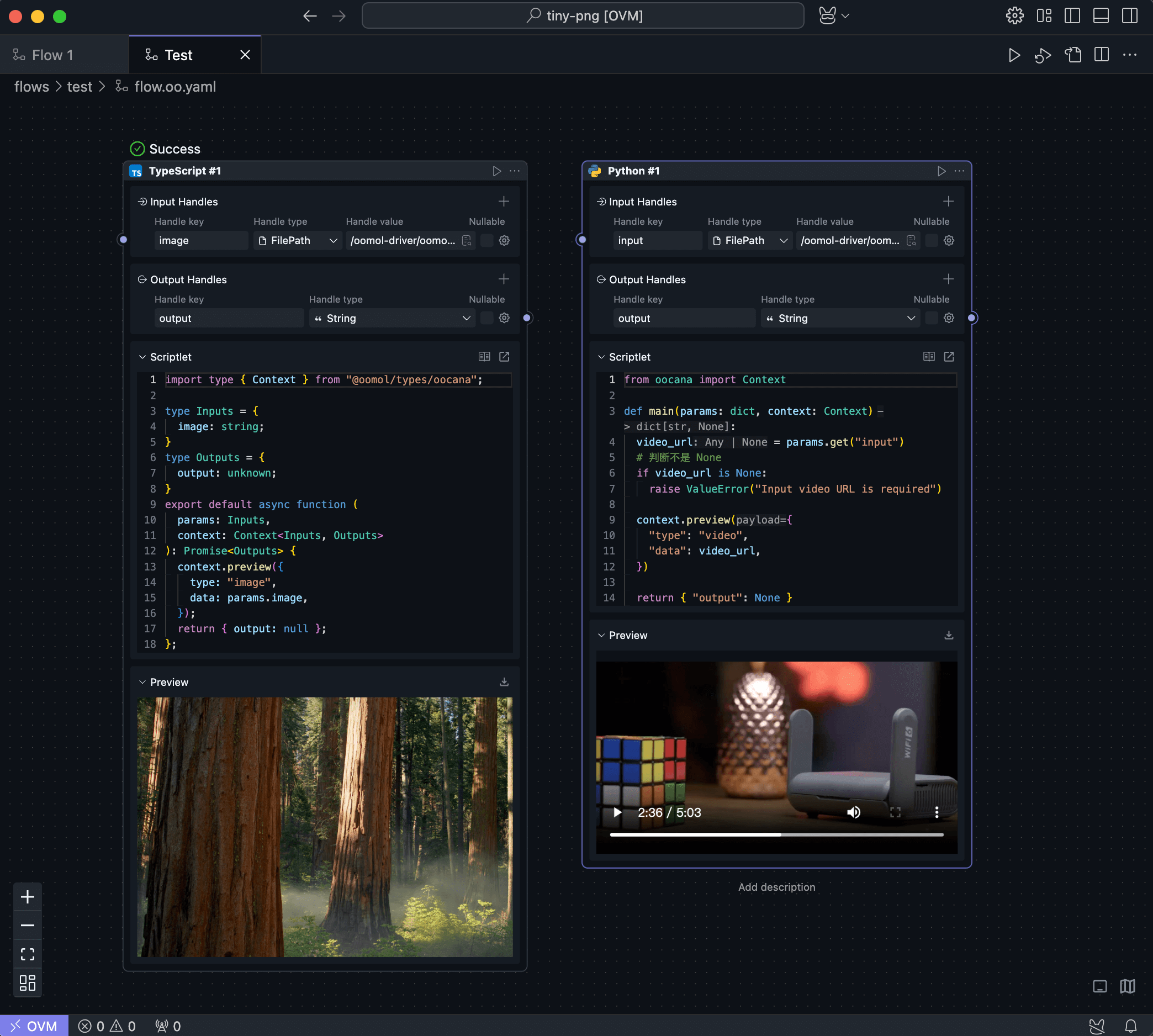
Detailed Types of the Context Object
The OOCANA SDK exposes the type definitions below so you can use these APIs precisely. In practice, the editor's inline type hints are often the easiest reference.
interface Context<
  TInputs = Record<string, any>,
  TOutputs = Record<string, any>,
> {
  readonly sessionId: string;
  readonly jobId: string;
  readonly block_path: string;
  readonly stacks: readonly BlockJobStackLevel[];
  readonly inputs: TInputs;
  readonly output: {
    <THandle extends Extract<keyof TOutputs, string>>(
      handle: THandle,
      output: TOutputs[THandle]
    ): Promise<void>;
    /**
     * @deprecated This method will be removed in the future. Please use the function without the done parameter. If you want to report block completion, please use context.done().
     * Report block output.
     * @param handle Output handle
     * @param output Output value
     * @param done Will be removed. Report block completion.
     */
    <THandle extends Extract<keyof TOutputs, string>>(
      handle: THandle,
      output: TOutputs[THandle],
      done: boolean
    ): Promise<void>;
  };
  /** Report block completion */
  readonly done: (err?: any) => Promise<void>;
  /** Report log */
  readonly logJSON: (jsonValue: unknown) => Promise<void>;
  /** Report an error */
  readonly error: (error: unknown) => Promise<void>;
  /** Report additional block messages */
  readonly sendMessage: (payload: unknown) => Promise<void>;
  /** Send to preview */
  readonly preview: (payload: PreviewPayload) => Promise<void>;
  /** Report block's stdio and stdout messages */
  readonly reportLog: (
    payload: string,
    stdio: "stdout" | "stderr"
  ) => Promise<void>;
  /** Temporary directory for the entire session, all blocks in a session will share the same directory */
  readonly sessionDir: string;
  /** Report progress, progress 0 ~ 100, this function is throttled to trigger every 300ms */
  readonly reportProgress: (progress: number) => Promise<void>;
  /** Read the current OOMOL token for calling OOMOL-owned services such as Fusion */
  readonly getOomolToken: () => Promise<string>;
  /** Runtime Fusion API base URL */
  readonly fusionApiUrl: string;
  readonly keepAlive: KeepAlive;
}
More Use Cases
Please refer to the project Node.js Use Cases.
You can clone this project locally and open it with OOMOL Studio. The flows in this project include most of the usage methods for the Context API.